At Google’s virtual “Android Show: I/O Edition” event on Tuesday, the tech giant announced a series of upcoming updates and features, including improved Gemini Intelligence features, new hardware called Googlebooks, and other Android improvements, like vibe-coded widgets, Gemini in Chrome, and new emoji.
The features are arriving ahead of Google’s annual developer conference this month, which will largely focus on AI, as it did last year.
Below, we’ve compiled all of Google’s announcements for you right here.
Googlebooks

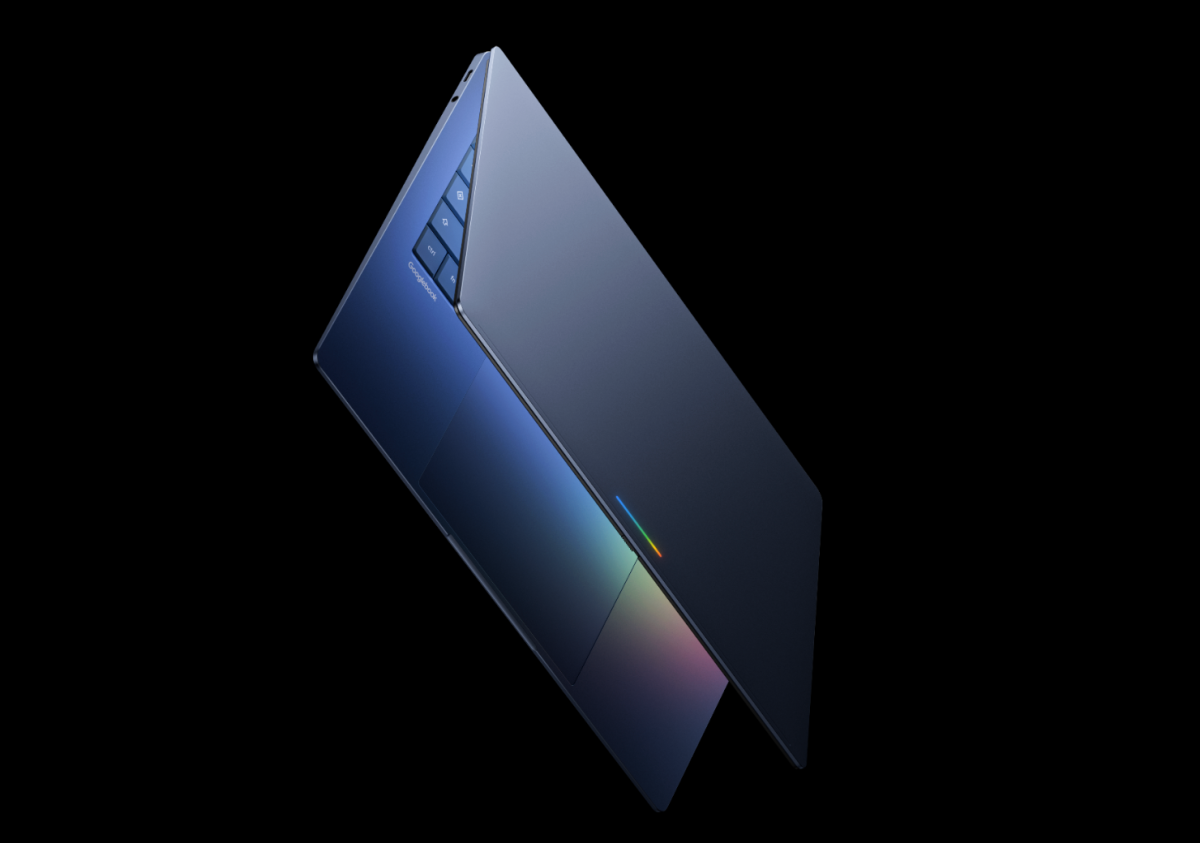
Google unveiled Googlebooks, its new line of laptops built with Gemini at their core. The tech giant is working with partners like Acer, Asus, Dell, HP, and Lenovo to make the first Googlebooks in a variety of shapes and sizes.
The company says Googlebooks, which are launching this fall, are the first laptops designed from the ground up for Gemini Intelligence to offer personal and proactive help.
The laptops will ship with “Magic Pointer,” a new kind of cursor with Gemini built in, compatibility with Android phones that will allow people to use apps from their phone right from their Googlebook, the ability to create custom widgets, and more.

Google unveiled a new “Create My Widget” feature that lets users vibe-code their own custom widgets. The new feature will first launch on the latest Samsung Galaxy and Google Pixel phones this summer.
Users will be able to create widgets by describing what they want using natural language. For example, you could ask the feature to “suggest three high-protein meal prep recipes every week” in order to get a custom dashboard that you can add and resize on your home screen.

Updates to Android Auto
Android Auto is getting a refresh that brings more personalization, widgets, and an edge-to-edge experience to your dash to fit any screen, whether it’s an ultrawide angle, a circle, or a unique shape. Users can add widgets that let them see the things that matter most at a glance, even while using navigation.

Media apps like YouTube Music and Spotify are also getting redesigned interfaces aimed at making them easier to use in the car.
Additionally, for the first time in Android Auto, you’ll be able to watch videos on apps like YouTube in 60fps full HD in supported cars later this year, starting with BMW, Ford, Genesis, Hyundai, Kia, Mahindra, Mercedes-Benz, Renault, Škoda, Tata, and Volvo.

Google said Gemini is now rolling out broadly on Android Auto, letting drivers ask questions, brainstorm ideas, or learn about topics hands-free while on the road. The company also said users will be able to place food orders from the car, beginning with DoorDash.
3D Emoji

Google announced that all 4,000 Android emojis have been refined to make them more true to how they actually are. Launching later this year, the new emojis are designed to feel less flat and more expressive and real.
Features for creators
Android is launching a “Screen Reactions” feature that records you and your screen at the same time, a format often seen on TikTok and Instagram Reels. The feature is first rolling out on Pixel devices this summer.

Google also partnered with Meta to bring the best of Instagram to its Android devices, including Ultra HDR, native stabilization, and night mode. Additionally, the company optimized the capture-to-upload pipeline to ensure your photos and videos remain sharp when you post them.
The tech giant is bringing new tools to Meta’s Edit app, exclusively on Android, including “smart enhance” to upscale photos and “sound separation” to boost and remove sounds.
Gemini’s agentic features

Under Gemini Intelligence, the assistant will be able to take data from one app and perform multistep functions across apps. For instance, you can take a photo of an event flyer and ask the assistant to find that event on sites like Expedia.
With this feature, users could also invoke the assistant with their grocery list on screen and ask it to build a cart based on those items in the shopping app of their choice.

Gemini in Chrome
The company is now introducing Gemini in Chrome to Android, after earlier launches on iOS and desktop, allowing users to summarize content or ask questions about what they see on the webpage. Android users will also get the experimental auto-browse feature that can navigate websites and complete tasks like booking a ticket on a user’s behalf.
Form filling
Gemini will be able to use data from Personal Intelligence to help users fill out complex forms on mobile through an opt-in feature.

Dictation
Google launched a new feature in Gboard called Rambler that turns your speech into cleaned-up text — similar to apps like Wispr Flow and Monologue. The feature removes filler words like “ums” and “ahs” and also understands when you say “Let’s meet at 3 PM… um, 2 PM” and posts “Let’s meet at 2 PM” as a final result.

Extended AirDrop support
Last year, Google added a way for Pixel phones to share photos and files with iPhones by making Quick Share work with AirDrop. The company said that this year, the feature will be available to users of other smartphone companies, including Samsung, Oppo,
OnePlus, Vivo, Xiaomi, and Honor.
What’s more, if you don’t have a compatible device, you can use Quick Share on any device to generate a QR code, which will let you share files to the iPhone through the cloud.
Plus, Google said that soon users will be able to access Quick Share available within apps like WhatsApp.
Easier iPhone to Android transfer
Google is planning to introduce a new iOS-to-Android transfer that lets you import your passwords, photos, messages, favorite apps, contacts, eSIM, and your homescreen layout from your iPhone to your new Android phone. This feature will launch on Samsung Galaxy and Google Pixel devices this year.
Pause Point

A new Android feature will allow you to pause when launching an app you’ve labeled as one of your distractions. Before being able to scroll, game, or do whatever else it is that wastes your time, you’ll have to take a 10-second break and be confronted with other choices you could make instead — like launching your Google Play Books app to read, for instance. You can also optionally set a timer that cuts you off from using the app before you dive in.
Improved threat protection features

Google is also expanding its default-on theft protections to all Android users globally after earlier tests in Brazil. The features will be enabled by default on all new Android 17 devices, as well as freshly reset devices or those that have upgraded to the latest OS.
When enabled, features like Remote Lock and Theft Detection Lock will be automatically enabled, and Google is reducing the number of times a thief can try to guess your PIN or password. There will also be longer wait times between failed attempts. Law enforcement will now be able to access the device’s IMEI from the lock screen on Android 12 and higher, too, allowing them to quickly verify a device’s ownership if stolen.
In addition, the theft protections will be extended to devices running Android 10 and up in select markets, including Argentina, Chile, Colombia, Mexico, and the U.K.
Pixel users with up-to-date software and Advanced Protection Mode switched on now get Intrusion Logging, a security feature that helps to investigate suspected spyware attacks and device compromises.
When you purchase through links in our articles, we may earn a small commission. This doesn’t affect our editorial independence.